

Home data and telephone, are historically treated separately, however more and more they need to be considered at the same time, as they share similar topographical requirements, and can use similar wires. Ultimately by 2025 there will be no more analogue phone lines into houses – with the move to Voice over IP. This means there will only be a router in the home, and any phones will either come from an analogue phone line generated by the router, or will be fully digital relying on WiFi or other digital wireless technology.
For a small house, the Broadband Router that is usually sent free with the subscription to the service, will have a strong enough WiFi signal that will reach all around the house. The Routers typically also have four Ethernet ports on the back to plug your computers etc into. These Routers are built to a budget however, and often there are many facilities and features in a home network, that these routers will struggle to provide. There is often the danger of “spoiling the ship for a ha’penny of tar”, and relying on a freebie router to run a sophisticated home network. We recommend either ditching these routers in favour of a better one, or only using it to provide the link to the internet, with a more capable and robust router providing the Home Network.
Integrated thinking
Once upon a time houses were built with a phone line at the bottom of the stairs, as this was usually somewhere central where the phone could be heard from throughout the house. The telephone was powered from the line, and could be hung on the wall or could sit on a small telephone table. Now however, we use wireless handsets, and the base station requires mains power. Also there is the broadband router, security system and many other things that may need to be connected. This leads to a number of suggested rules when it comes to thinking about data and telephone wiring:
- Use at least Cat6 grade cable for both Data and telephone outlets
- Put the data / telephone outlets near to a mains socket.
- Put the telephone master socket near to the data hub & mains power
- Put telephone / data outlets near to work surfaces
- Make sure there is a data outlet within 10m or so of everywhere in the house for good WiFi Coverage
How many wires?
With todays modern systems, all wanting access to the internet, there are usually never enough connections available. We recommend that as a MINIMUM there are 2 Cat6 cables to each TV position, or TV equipment position (where the Sky box / Blu-Ray player is). There will also want to be Cat6 cables going to every location where you might want to either plug in a WiFi Access Point (WAP), Telephone, or any piece of equipment that might want access to the internet.
If you are wanting to future proof the house, then there is a certain amount of crystal ball gazing to be done. Essentially you’ll need to think about what things you might want to do in the future. This is more than just giving access to the internet from different places and devices, but also about control and information – you might want to think about:
- Computers
- Network storage / backup
- Audio Visual Equipment
- WiFi coverage
- Lighting
- Heating and cooling
- Curtains & Blinds
- Energy sources (Solar PV, heatpump etc)
- Motorised doors and Windows
- CCTV
- Security
- Gate Entry systems
We try to recommend wiring that is appropriate to the size and nature of the house, however it is always easier and cheaper to install wiring at a first fix stage of a build, or at least before any decoration, than as an afterthought, so generally there is a tendency to over specify wiring, with good cause.
Making sense of the wiring
 By the time all of the work surfaces , TVs, lights and bedside tables have a number of Cat6 cables coming from them to a central equipment area, there tends to be a huge bunch of cables, and these need to be sorted and terminated so they can be made sense of.
If there is space, we normally recommend a data cabinet and patch panel system is used to terminate the cables. This means that each outlet can be connected to whatever service is required, and that these can be changed around as required. Typical Facilities include: Telephone Distribution, Data Switch and HD TV distribution. These are all similar but with their own individual systems.

Sometimes we don’t have the space for a full distribution cabinet, and in this case the cables are terminated and wired directly into the appropriate service.
Left is a tight fit equipment cupboard, where we had to wall mount the data switch, and squeeze the data cables directly into it. In this case fortunately, the data switch was the only facility required.
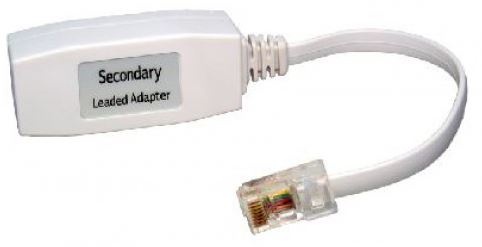 If all of the outlets around the house are RJ45 (Ethernet) data outlets, it is easy for these to be used as a phone socket with the aid of a simple in-line adaptor (right), or for the socket to be changed to a Phone socket.